


I really like the OSIsoft Learning website, for a few reasons:
- It lays out learning paths
- It gives you certificates that you can share on your LinkedIn profile under "Licenses & certifications"
- It offers a free course, which is clearly advertised on the home page, that introduces customers to the world of PI
- Its All Content page lets you easily search for what you want out of >130 pieces of content
However, the OSIsoft Learning website falls short in some places, namely:
- There is no big-picture view of the courses. For example, there is no easy way to tell which courses have the same content but in a different language. Also, you must click on a course to view its price, which makes "comparison shopping" difficult. If you don't already know what you want and you are just looking to browse what is available, you will have a hard time.
- The courses teach you mostly PI-specific skills (as they should), but you also need more general skills to work effectively with PI.
This blog post is all about improving your experience with OSIsoft Learning. This blog post has 3 parts:
- Overview of all courses——Addresses the 1st issue above
- Tips & tricks———————Take full advantage of what OSIsoft Learning offers!
- Power Query & DAX———Addresses the 2nd issue above
Warnings: I'm just a customer. Please correct me if I say something wrong. This blog post may become outdated at any time. (Actually, it is already outdated. The attached spreadsheet is more up-to-date.) This blog post contains some recommendations, which are my personal recommendations and are not coming from any company that I've worked for.
Overview of all courses
The spreadsheet
All tables in this section were generated using the Enhancing OSIsoft Learning With Excel spreadsheet, which is attached in a comment below. Using this spreadsheet, you can easily create tables like the ones in this section, and you can browse, filter, and analyze a tabular version of the All Content page. Best of all, this spreadsheet can be refreshed to automatically grab the latest available information from the All Content page.
That is the power of Power Query and Power Pivot. More on that later. 😉
Some tables below are dynamically squished to fit the width of the blog post. For the best viewing experience, either use the spreadsheet or right-click on the table and open the picture in a new tab.
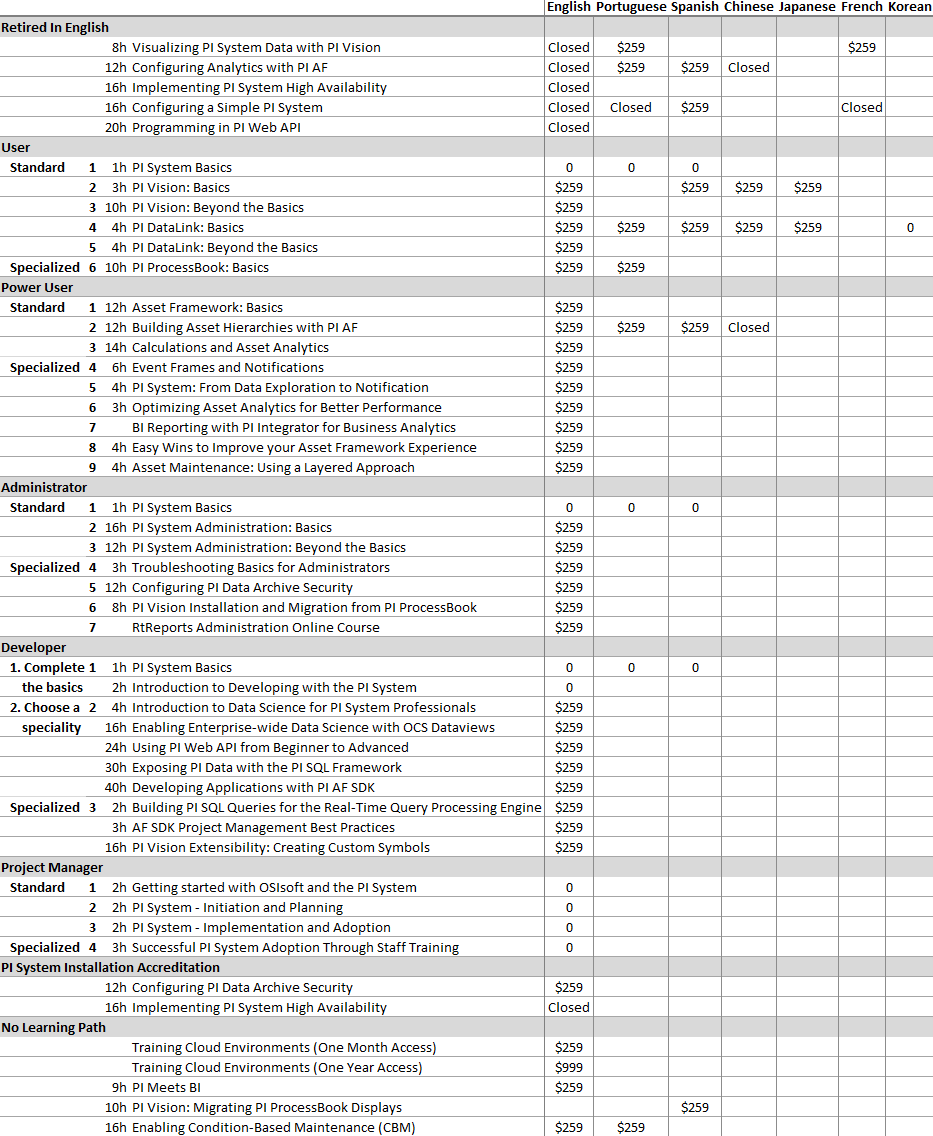
Self-paced courses
h = hours
Count of instructor-led courses
d = calendar days
h = hours
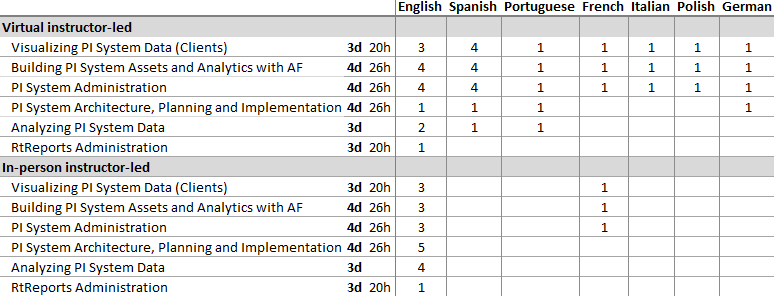
The study hours are left blank in the tables above if they are not stated in the course's "About this course". Vote here to have the study hours stated for all courses.
Instructor-led courses by country
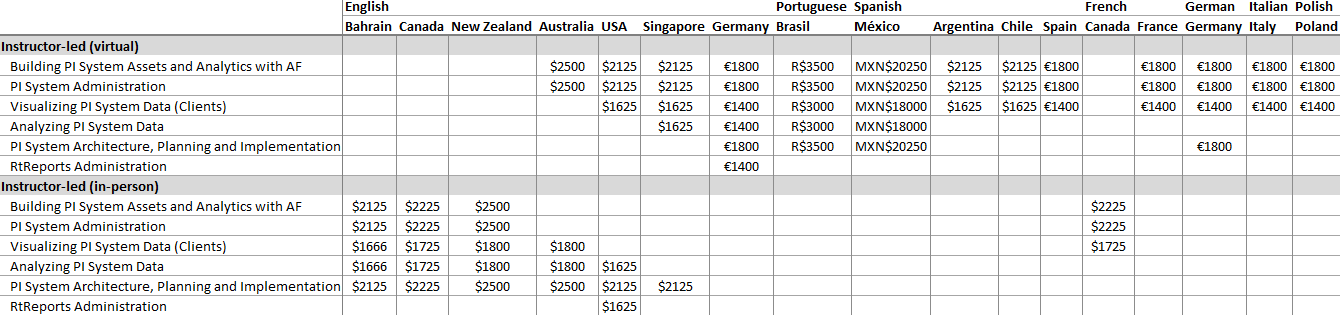
Prices of instructor-led courses
The prices of instructor-led courses depend only on the country and the number of days. The language and whether the course is taught virtually or in-person are irrelevant.
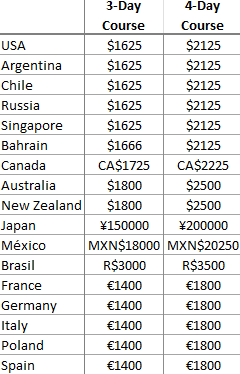
Summary of learning paths
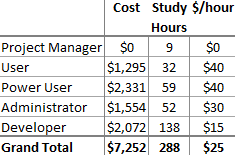
Courses with an unspecified number of study hours are counted as having 0 study hours.
Workbook languages
Column headers = language of instruction
Table values = language of the workbook
If a course does not appear in this table, then its corresponding page does not provide a link to a workbook.
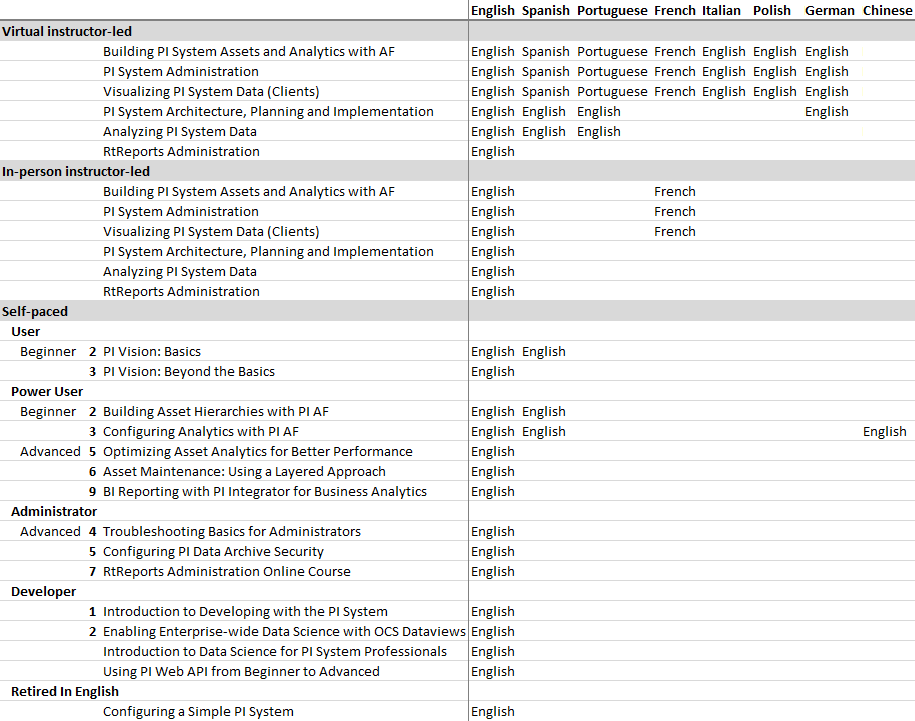
Alas, these are just screenshots of PivotTables in Excel, since tables don't work well on the new PI Square. Vote here to have that changed. Once tables are better supported, I can format the values with course links to make the tables more functional.
Trivia about the tables above and the spreadsheet (skip if you want):
- The rows and columns of each table were ordered to maximize the clustering of similar values within that table. This means that the ordering is not necessarily consistent across different tables.
- I manually grabbed the study times from the "About this course" section of each course
- There are 47 distinct courses that are not retired in any language: 38 self-paced, 6 instructor-led, 3 accreditation
- There are 129 course variants: 57 self-paced, 69 instructor-led, 3 accreditation
- It costs well over $100,000 to take every variant of every course
- All free courses are self-paced
- All paid self-paced courses are either $259 or $285. The latter is also the price of Training Cloud Environment (One Month Access).
- All instructor-led courses, whether virtual or in-person, are paid and have corresponding workbooks
- All courses in Korean are free and self-paced
- All retired courses are hidden and self-paced
- All self-paced French courses are retired in English
- All courses have an English version, but the English version may be retired
- All courses about RtReports are in English
- All courses about PI Cloud or PI Edge products are self-paced
- For the price of a 3-day instructor-led course, you could take 6 self-paced courses or become a PI System Infrastructure Specialist and have money to spare either way
- For the price of a 4-day instructor-led course, you could take 8 self-paced courses or take all courses required to become a PI System Installation Specialist and have money to spare either way
- >18% of all distinct non-retired self-paced courses are free in ≥1 language
- 10 of the 23 (>43%) self-paced courses that are not in English either are retired in English, are closed for registration, or focus on a deprecated product
- "PI ProcessBook: Basics" is the only course that focuses on a deprecated product
- "PI DataLink: Basics" is the
- self-paced course that is offered in the most languages (5, which is all available languages for self-paced courses except for French)
- only course that can be free or paid depending on the language
- only course available in Korean
- Canada, Bahrain, and New Zealand offer instructor-led courses only in person
- Canada is the only country that offers in-person instructor-led courses in
- >1 language
- a language other than English
- Germany is the only country that
- offers virtual instructor-led courses in >1 language
- delivers, in a single format (virtually in this case), all distinct instructor-led courses
- Germany and the USA are the only countries that offer all distinct instructor-led courses
- Australia, Singapore, and the USA are the only countries that offer instructor-led courses both virtually and in-person
- "Building PI System Assets and Analytics with AF", "PI System Administration", and "Visualizing PI System Data (Clients)" are
- offered by all countries that offer instructor-led courses
- the only instructor-led courses whose workbooks are available in a language other than English
- No country offers the same instructor-led course both virtually and in-person
- "PI System Basics" is the only course that appears in multiple learning paths
- No "Beyond the Basics" course is available in a language other than English
- No learning path can be completed in a single language other than English
- The Project Manager learning path is the only learning path
- whose courses are only in English
- that can be completed entirely for free
- that does not use any workbooks
- to be removed from the OSIsoft Learning home page
- Of all learning paths, the Developer learning path has the least overlap with the instructor-led courses
- All courses that are taught in Chinese, German, Italian, Polish, and Russian use English workbooks
- The only languages used for workbooks are English, French, Spanish, Russian, Portuguese, and Japanese
- If an instructor-led course has a workbook, then the language of the workbook will be either English or the language of instruction
- If a self-paced course has a workbook, then the workbook will be in English
- It takes 18 hours to finish all free courses
- It takes 21 calendar days to finish some version of all instructor-led courses
- The level of a course according to the learning paths does not always match the level in the "About this course"
- There are 19 hidden courses. See this suggestion for more details about hidden courses.
- Some non-hidden courses are not mapped to any filters on the All Content page (e.g. Japanese PI DataLink: Basics)
- The only items on the All Content page that cannot be marked as "Complete" are:
Free courses:
- PI System Basics in all available languages (English, Portuguese, Spanish, German) (1st course in the User, Power User, Administrator, and Developer learning paths)
- Introduction to Developing with the PI System (2nd course in the Developer learning path)
- All courses in the Project Manager learning path:
- PI DataLink로 기본적인 보고서 만들기 (Korean version of "PI DataLink: Basics", 4th course in the User learning path)
- PI System Installation Accreditation (registration requires the completion of paid prerequisites)
Free non-course content:
- OSIsoft Learning Guide
- Asset Based (AF) Example Kits (can be marked as "Complete" but you won't get a certificate)
- Video Links for Blocked/Offline YouTube Access (can be marked as "Complete" but you won't get a certificate)
- Partner Bootcamp (Course Template) (for OSIsoft's internal use; cannot be completed)
Accreditation content (anyone can register but only OSIsoft partners can become accredited; vote here to change that):
- PI System Infrastructure Specialist
- PI System Installation Accreditation
- PI System Application Developer Accreditation
Non-retired courses to potentially skip (8 total: 6 self-paced, 2 instructor-led):
- Configuring a Simple PI System is retired in all languages except for Spanish in favour of PI System Administration: Basics
- Visualizing PI System Data with PI Vision is retired in English (but not in other languages) in favour of PI Vision: Basics and PI Vision: Beyond the Basics
- PI ProcessBook is deprecated in favour of PI Vision. If your organization does not use PI ProcessBook, you can skip:
- PI ProcessBook: Basics (English, Portuguese), which is the last course in the User learning path
- Part 2 of PI Vision Installation and Migration from PI ProcessBook (English), which is the 6th course in the Administrator learning path. Skip only if your organization does not currently use PI ProcessBook AND does not need to continue using any PI ProcessBook displays.
- PI Vision: Migrating PI ProcessBook Displays (Spanish). Skip only if your organization does not currently use PI ProcessBook AND does not need to continue using any PI ProcessBook displays.
- Visualizing PI System Data (Clients) (maybe). Think carefully before you take a version of this course that uses a non-English version of the workbook (i.e. French, Spanish, and Portuguese) since these versions dedicate a huge portion to PI ProcessBook. PI ProcessBook was removed from the English version of the workbook, which is used in the English, German, Italian, and Polish versions of this course.
- If RtReports is not useful in your industry, you can skip:
- RtReports Administration (USA, Germany)
- RtReports Administration Online Course, which is the last course in the Administrator learning path
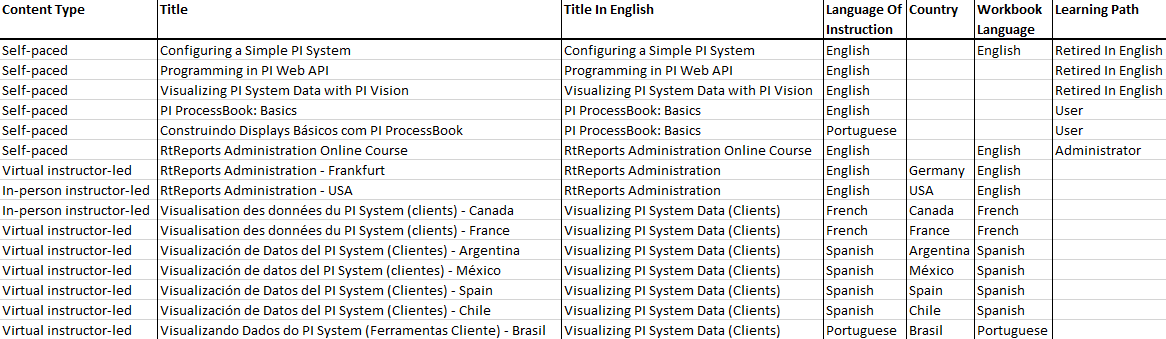
Courses to potentially skip (table) (outdated):
Tips & tricks
Take the free courses!
OSIsoft Learning has 10 free courses (7 if you ignore language), but these are easy to miss because all of them except for the English version of PI System Basics are not clearly advertised as being free. Vote here if you want the free courses to be more discoverable. The free courses are listed in the previous section.
You should take some free courses especially if you are new to PI and are a designated PI person at your organization. The courses will give you a good overview of PI and of how to ease others into embracing it. Besides, these are more entries for the "Licenses & certifications" section of your LinkedIn profile!
For any free course whose content you already know, you can register for the course and just click on "Next" on all of the video pages to mark them as  , which leaves you with just the quizzes and the final exam to complete. This can be a great refresher, even if the course is in a language that you do not understand. Speaking of which…
How to take free courses that are in a language that you do not understand
First and foremost, register for the free courses while they are still free. Some free courses are available as paid courses in other languages. At the bottom of the "About this course" page of all self-paced courses, OSIsoft provides a link to the course videos so that you can watch them before paying for the course. (I guess that you're paying not for the knowledge, but for exercises, the support, 30 days of access to the training cloud environment, and the proof that you completed the course.)
For any free course that you want to take that is in a language that you do not understand, watch the videos of an equivalent course that is in a language that you do understand. In the free course, click on "Next" to skip the videos yet still mark them as . To read the text portions of the free course, such as the final exam, use the translation feature of your browser or a translation add-on/extension for your browser. Admittedly, this experience is worse than taking the course in a language that you understand, but hey: free is free.
Finish your unfinished online courses
Before ~2019, online courses had to be completed in 3 weeks and had a project component. If life got in the way, then you didn't finish the course. The project component for most online courses has been replaced with a 10-question final exam, so you can now finish those unfinished courses! I completed the English version of Configuring A Simple PI System 4 years after I registered for it and after it was retired.
Watch at a higher speed
The videos for the online courses are hosted on YouTube, which allows you to watch videos at a higher speed.
This can save time, especially if you already know the material well and just want to learn more. It also helps you fight the forgetting curve and make more connections between ideas that are introduced farther apart in the courses.
Just be careful to not set the video speed faster than you can process the information. Also, make sure that you can still understand what is being said.
Power Query & DAX
To analyze large amounts of PI data, PI DataLink is insufficient, and you will probably use the PI Integrator For Business Analytics or one of the PI SQL products (PI OLEDB Provider, PI OLEDB Enterprise, PI SQL Client, etc.).
To use these PI programs effectively with Excel or Power BI, you need to use the Power Query and DAX languages, which OSIsoft Learning does not teach. The next sections will guide you on how to learn these languages. Also, the spreadsheet from the 1st part of this blog post uses Power Query and DAX. Use it as an example of what these languages can do!
Learning DAX
DAX is the formula language of SSAS Tabular, Power BI, and Excel's Power Pivot. It is used to write calculations (measures) that are then used in visualizations. The calculations act on the Data Model, which is a network of linked tables. These tables are the output of Power Query.
Unfortunately, DAX is currently quite difficult to learn for several reasons:
- DAX looks like Excel's formula language, which misleads users into thinking that they work similarly, which they don't
- There are no debugging tools to help you step through a calculation or visualize parts of it
- There is little official documentation on how a formula is evaluated
- The foundation that you need to understand DAX is too large to learn from sporadic Google searching. You need to learn the whole thing at once.
To learn DAX, I recommend taking SQLBI's courses, especially Mastering DAX, which is absolutely critical to understanding DAX. If you are skeptical, you can start with their free Introducing DAX and Introduction To Data Modeling For Power BI courses. Just like the OSIsoft Learning courses, SQLBI's courses can be added to the "Licenses & certifications" section of your LinkedIn profile.
Tips:
- Wait for a Black Friday or Cyber Monday sale (historically 20% off)
- Watch the videos at double speed
SQLBI isn't compensating me to say any of this. I'm just very happy with my experience with them.
Learning Power Query (M)
Power Query, informally called "M", is the programming language that is used to reshape, clean up, and transform data in Excel and Power BI. It outputs the tables that DAX uses in its calculations. Luckily, Power Query is much easier to learn than DAX or even Excel formulas. This is largely thanks to the GUI, which lets you avoid writing code for common data manipulations and lets you step through and individually edit your changes.
I recommend learning Power Query by Google searching and by experimenting with the GUI and the code that it generates. For examples of Power Query in action in a PI context, see my PI spreadsheets… OF JUSTICE!
Below, I list some of the less obvious aspects of Power Query code. Keep them in mind and you should have no problem learning how to code in Power Query.
- Rows are records: a collection of named values, enclosed in [ ]
- Columns are lists: a collection of values, often but not necessarily of the same type, enclosed in { }
- Records, lists, and table cells can contain records, lists, and tables. e.g. In a table, you can have a column of lists.
- "each" declares a function with a single argument called "_". "each" is equivalent to "(_) =>". It is commonly used to describe a transformation function when iterating rows in a table or items in a column or list.
- [ColumnOrField] is equivalent to _[ColumnOrField]. If you have a variable called "_" (e.g. from a function declared using "each") that represents a table or a record, you can omit the variable name when accessing a column or field, respectively.
- In a "let… in…" statement, execution begins in the "in" section. The variables declared in the "let" section are shorthand representations of the expressions to which they are assigned. Unless a buffer function is used, variables reevaluate each time they are used and do not store values in memory. The buffer functions are Table.Buffer, List.Buffer, and Binary.Buffer.
- {1 .. 5} = {1, 2, 3, 4, 5}
Conclusion
In summary:
- Use my "Enhancing OSIsoft Learning With Excel.xlsb" spreadsheet from this folder to browse and analyze OSIsoft Learning like never before
- OSIsoft Learning has 10 free courses
- You can now finish your unfinished online courses
- Consider watching course videos at a higher speed
- If you are using the PI Integrator For Business Analytics or any of the PI SQL products with SSAS Tabular, Power BI, or Excel's Power Pivot, then you should learn DAX from SQLBI's video courses and learn Power Query by experimenting and Google searching. See this blog post for these languages in action.
I hope that this blog post helped you on your journey to becoming a PI-kémon Master! If you liked this blog post, consider checking out my other blog posts here. Until next time!
