


Today I came across this post asking how to return multiple table values from a table lookup attribute with the use case being to dynamically build an email list for use with notifications’ dynamic email delivery endpoint. My first thought was table lookups can only return a single value, but then I thought, “well, let’s see if they actually work with the array data types.” Sure enough, I was able to return multiple lookup results to a string array! Read on for the details.
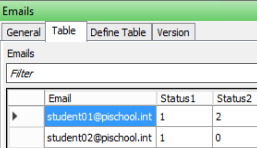
The table:
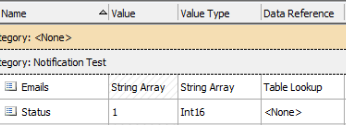
The attributes for the table lookup testing:
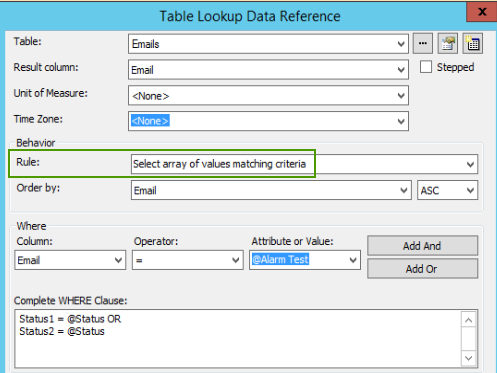
The table lookup configuration; to my surprise the Behavior Rule allows you to return an array of values when the attribute is set to an array type:
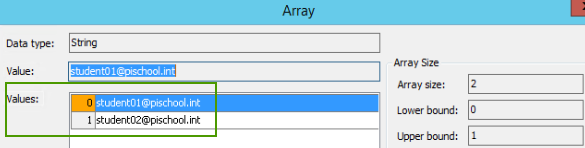
The resulting attribute value when Status = 1:
So now I had my array of values, but how to build the email list from this? Recently I was playing with Format function in the String Builder data reference and noticed it had the ability to handle arrays (function syntax like, Format(array, delimiter)), but I thought at the time, “what would you use that for?” Well now I know of at least one case! The final step here was to add a String Builder attribute called Email List and use it to convert the array above into a comma separated list:
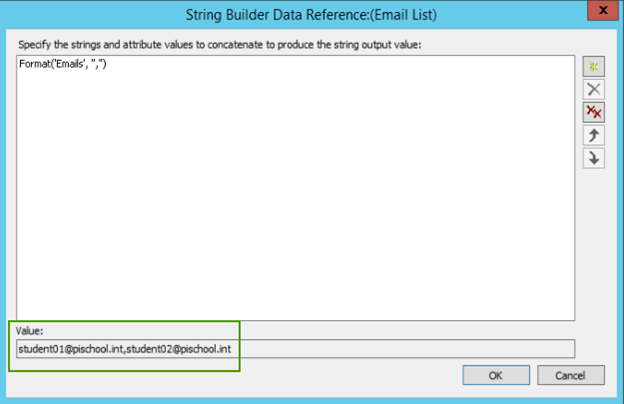
As you can see from the Value field, we get exactly the list we want to plug into our notification dynamic email delivery endpoint!
I feel like this opens up some other possibilities to use table lookups and arrays so if you think of any interesting use cases, please post them in the comments below. And as always, thanks for your time!
-

Community User
-
Cancel
-
Vote Up
0
Vote Down
-
-
Sign in to reply
-
More
-
Cancel
Comment-

Community User
-
Cancel
-
Vote Up
0
Vote Down
-
-
Sign in to reply
-
More
-
Cancel
Children